
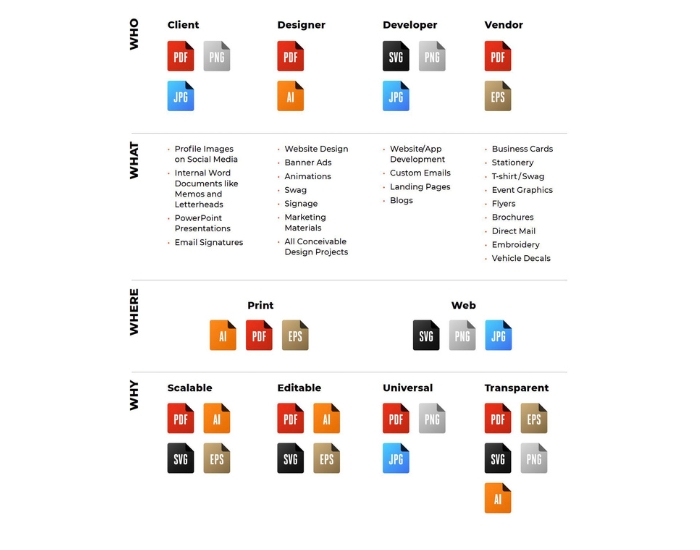
After investing in a professional logo, many business owners receive a folder containing several different file types—SVG, PNG, AI, EPS, PDF, JPG, and sometimes even more. At first glance, they all appear to contain the same logo, leaving many people wondering why so many versions are necessary.
The truth is that each logo file serves a different purpose. One format is ideal for websites, another is designed for large-format printing, while another is required for professional editing or embroidery. Using the wrong file can result in blurry graphics, poor print quality, unexpected color changes, or extra costs when working with printers and marketing professionals.
If you’ve ever asked questions like “Which logo file should I send to my printer?”, “What’s the difference between SVG and PNG?”, or “Why did my designer give me an AI file?”, you’re not alone. These are some of the most common questions business owners ask after receiving their final logo package.
Understanding these file formats doesn’t require a graphic design background. Once you know what each file is designed to do, choosing the right one becomes much easier. More importantly, you’ll avoid quality issues that could affect your branding across websites, social media, apparel, business cards, signs, promotional products, and advertising materials.
In this guide, we’ll explain the most common logo file formats in simple language, show when each one should be used, and help you understand why professional designers provide multiple versions of the same logo.
Table of Contents
Important Note
Receiving multiple logo files isn’t unnecessary—it’s essential. Every format has a specific purpose, and using the correct one helps your logo remain sharp, professional, and consistent across websites, business cards, signs, uniforms, social media, packaging, and every other place your customers see your brand.
Why Logo File Formats Matter More Than Most Business Owners Realize
Your logo is one of the few business assets that appears almost everywhere. It represents your company on your website, social media profiles, storefront signs, uniforms, invoices, email signatures, vehicle graphics, promotional merchandise, brochures, business cards, product packaging, trade show displays, and advertising campaigns. Because it appears in so many places, no single file type can meet every need.
Imagine trying to print a billboard using the same small image you uploaded to Facebook. While it may look perfectly clear on your phone, enlarging that image to several feet wide would reveal blurry edges and visible pixels. Likewise, sending a printer a web-only logo file often leads to delays because the artwork isn’t suitable for professional production.
Professional designers solve this problem by delivering your logo in multiple formats. Each file is optimized for a specific use, ensuring that your branding remains crisp and consistent whether it’s displayed on a mobile screen or printed across the side of a commercial vehicle.
Having the correct files also saves time and money. Printers, embroidery companies, sign shops, web developers, and marketing agencies frequently request specific formats. If you already have those files available, projects move forward more quickly without the need to recreate or convert your logo later.
Think of your logo files as different tools in a toolbox. While they all contain the same design, each one is built for a different job.
Need All the Right Logo Files?
At Atlanta Logo, every professionally designed logo includes the file formats businesses need for websites, social media, printing, signage, apparel, vehicles, and future branding projects. We also convert low-quality or AI-generated logos into professional, high-resolution vector files.
Call (404) 678-8481 to speak with one of our designers today.
Understanding the Difference Between Vector and Raster Logo Files
Before exploring individual file formats, it’s helpful to understand the two main categories of digital graphics: vector and raster. This simple distinction explains why some logo files can be enlarged infinitely while others become blurry.
What Is a Vector Logo?
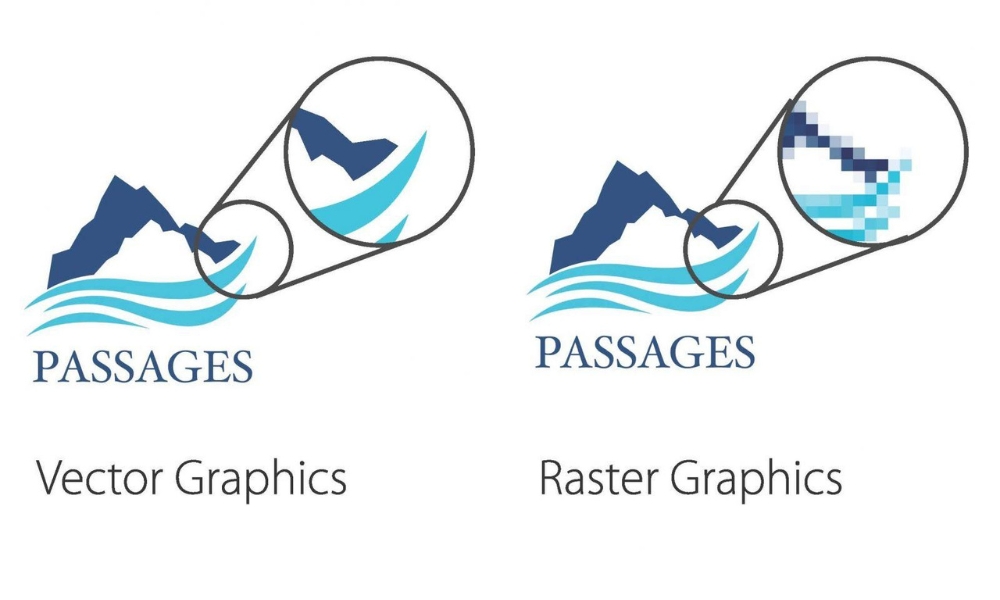
Vector graphics are created using mathematical paths instead of individual pixels. Rather than storing tiny colored squares like a photograph, a vector file stores precise instructions that define shapes, lines, and curves.
Because of this, a vector logo can be resized almost endlessly without losing quality. Whether it’s printed on a pen, embroidered onto a polo shirt, displayed on a website, or stretched across a highway billboard, the edges remain perfectly sharp.
This flexibility makes vector files the foundation of professional branding. They’re the preferred choice for commercial printing, large-format signage, engraving, promotional products, packaging, vehicle graphics, and nearly every type of professional production.
What Is a Raster Logo?
Raster images are made up of tiny squares called pixels. Every digital photograph, screenshot, and most web graphics use this format.
Raster files work exceptionally well for digital applications because they display quickly on websites and social media. However, enlarging them beyond their original dimensions causes those pixels to stretch, resulting in blurry or jagged edges.
This is why a logo downloaded from a website or copied from social media often looks poor when printed on signs or apparel.
Which Type Should Your Business Keep?
The best answer is both. Professional businesses typically maintain vector files for printing and production while also keeping optimized raster versions for websites, presentations, email signatures, and online marketing.
Having access to both ensures your branding stays consistent regardless of where your logo appears.
What Is an SVG Logo File?
SVG stands for Scalable Vector Graphics. It’s one of the most versatile logo formats available today because it combines the advantages of vector artwork with excellent compatibility for websites and modern digital platforms.
Unlike PNG or JPG files, SVG graphics remain perfectly sharp no matter how large or small they’re displayed. They also maintain relatively small file sizes, helping websites load quickly without sacrificing image quality.
Because SVG files scale flawlessly, they’re commonly used for website headers, navigation menus, responsive web design, mobile applications, icons, and digital presentations.
Another advantage is that SVG files can often be animated or customized using web technologies such as CSS and JavaScript, making them popular among web developers.
When Should You Use an SVG File?
- Company websites
- Responsive web design
- Mobile applications
- Digital presentations
- Online branding
- Email signatures
- Interactive web graphics
If someone asks for a logo specifically for a website, SVG is often one of the best choices.
What Is a PNG Logo File?
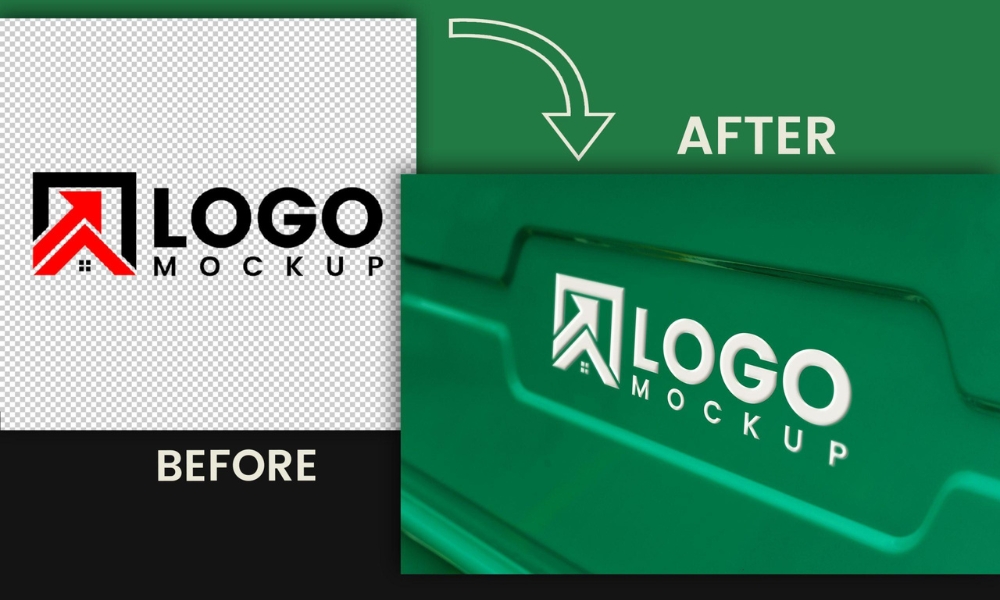
PNG is one of the most widely used logo formats because it supports transparent backgrounds. Instead of appearing inside a white box, a PNG logo can be placed neatly over colored backgrounds, photographs, presentations, websites, or marketing graphics without visible borders.
This flexibility makes PNG files especially useful for day-to-day business activities. They’re commonly used on social media, PowerPoint presentations, email signatures, online advertising, and websites that don’t specifically require SVG graphics.
Unlike vector formats, however, PNG files are raster images. That means they should always be exported at the appropriate resolution for their intended use. Enlarging a small PNG beyond its original dimensions will eventually reduce image quality.
For this reason, professional designers typically provide high-resolution PNG files for digital use while also including vector versions for future printing and production.
When Should You Use a PNG File?
- Social media graphics
- Website images
- Email signatures
- Online advertisements
- Presentations
- Digital documents
- Transparent background graphics
PNG is one of the files you’ll probably use most often in everyday business, but it shouldn’t replace your vector logo files.
Professional Logo Files for Every Application
Whether you need a brand-new logo or want to convert an existing low-resolution image into professional vector artwork, we provide complete logo packages with every file format your business needs.
Learn more about our Branding Services or call (404) 678-8481 to get started.
What Is an AI Logo File?
An AI file is the original source file created in Adobe Illustrator, one of the most widely used professional graphic design programs in the world. Think of it as the master version of your logo. Every other format—whether it’s SVG, PDF, PNG, or EPS—is usually exported from this original artwork.
Unlike image files, an AI file contains editable vector paths, fonts, colors, layers, and design elements. This allows professional designers to make changes without reducing image quality. If your business ever decides to update its logo, adjust colors, create alternate layouts, or expand your branding, the AI file makes those edits much easier.
For growing businesses, this file is incredibly valuable because it protects your long-term investment. Years from now, if you hire another designer or marketing agency, they’ll typically ask for your AI file first since it provides the greatest flexibility.
Although most business owners won’t open or edit an AI file themselves, it’s one of the most important assets to keep safely backed up.
Best Uses for AI Files
- Professional logo editing
- Future logo revisions
- Brand identity development
- Commercial printing preparation
- Large-format graphics
- Marketing agency collaboration
What Is an EPS Logo File?
EPS stands for Encapsulated PostScript, and although it has existed for decades, it remains one of the most widely accepted vector file formats in the printing industry.
Many commercial printers, embroidery companies, sign manufacturers, engraving specialists, promotional product suppliers, and apparel decorators continue to request EPS files because they’re compatible with a wide variety of professional production equipment.
Like AI files, EPS graphics are vector-based, meaning they can be resized without losing quality. Whether your logo appears on a business card or a forty-foot billboard, an EPS file maintains crisp, clean edges.
Even if you don’t use an EPS file today, there’s an excellent chance you’ll need it at some point in the future when ordering signage, uniforms, vehicle wraps, banners, trade show displays, or branded merchandise.
Best Uses for EPS Files
- Commercial printing
- Embroidery
- Vehicle graphics
- Storefront signage
- Promotional products
- Packaging production
- Large-scale advertising
What Is a PDF Logo File?
Most people think of PDF files as documents, but they’re also excellent for sharing professional logos. When exported correctly from vector artwork, a PDF preserves sharp edges and high-quality graphics while remaining easy to open on almost any computer.
One reason designers frequently provide PDF logos is convenience. Unlike AI files, which require specialized software, PDF files can usually be viewed immediately without installing design programs.
Print shops also appreciate PDF files because they preserve layout accuracy, fonts, colors, and vector information. Many brochures, flyers, catalogs, presentations, and printed marketing materials are submitted as PDFs for production.
For many businesses, PDF becomes the preferred format for sharing logos internally while reserving AI and EPS files for professional editing or manufacturing.
Best Uses for PDF Files
- Sharing logos with clients or vendors
- Business presentations
- Commercial printing
- Marketing materials
- Internal company documents
- Brand guidelines
Important Note
Many businesses discover they need vector files only after placing an order for signs, uniforms, embroidery, or promotional products. If you only have a small JPG or PNG copied from your website, your printer may need to recreate the artwork before production can begin. Keeping your original AI, EPS, SVG, and PDF files safely backed up saves time, money, and unnecessary delays.
JPG vs. PNG: Which Should You Use?
Business owners often confuse JPG and PNG because both are commonly used online. While they may look similar at first glance, they’re designed for different situations.
JPG (or JPEG) is excellent for photographs because it keeps file sizes relatively small. However, it doesn’t support transparent backgrounds, and every time the file is compressed, a small amount of image quality can be lost.
PNG, on the other hand, supports transparent backgrounds and generally preserves sharper edges around logos and graphics. That’s why most professional logo packages include PNG instead of JPG for digital branding.
If you’re uploading a logo to social media, placing it on your website, adding it to a presentation, or using it in email marketing, PNG is usually the better option.
JPG still has value, especially for marketing materials where transparency isn’t required and smaller file sizes are helpful. However, for everyday branding, PNG is typically the preferred raster format.
Which Logo File Should You Use?
The answer depends entirely on where your logo will appear. There’s no single “best” file because each format was designed for a specific purpose.
If you’re building a modern website, SVG provides outstanding quality and scalability. For social media, presentations, and digital marketing, PNG usually offers the best combination of quality and convenience. Commercial printers frequently request AI, EPS, or PDF files because they preserve vector quality throughout production.
If you’re working with a professional designer, never hesitate to ask which file they recommend for your project. Using the correct format from the beginning helps prevent printing issues, blurry graphics, unnecessary redesign costs, and project delays.
Keeping every version organized in a dedicated folder also makes future branding projects much easier, especially as your business grows and your marketing expands.
Need High-Resolution Vector Files?
If you only have a blurry JPG, screenshot, or AI-generated logo, our Graphic Design Services can professionally recreate your artwork as scalable vector files. We also build complete brand identity systems and responsive websites through our Website Design Services, helping your business maintain a consistent, professional appearance across every platform.
Call (404) 678-8481 to learn more.
Don’t Let the Wrong File Hurt Your Brand
Every logo deserves professional file preparation. From websites and social media to business cards, signs, apparel, and vehicle graphics, we’ll make sure your branding is ready for every application.
Explore our Professional Logo Design Services or call (404) 678-8481 today.
Logo File Format Comparison
Now that you understand what each file type does individually, it’s much easier to see how they work together. Professional logo packages include multiple formats because every business eventually needs its branding for different applications. Rather than converting files repeatedly, you’ll already have the correct version ready to use.
| File Type | Best For | Vector? | Transparent Background |
|---|---|---|---|
| SVG | Websites, apps, responsive design | ✔ Yes | ✔ Yes |
| PNG | Social media, presentations, websites | ✖ No | ✔ Yes |
| AI | Professional editing and branding | ✔ Yes | ✔ Yes |
| EPS | Printing, signage, embroidery | ✔ Yes | ✔ Yes |
| Sharing, print-ready documents | ✔ Usually | Depends on export | |
| JPG | Photos and simple digital use | ✖ No | ✖ No |
Which Logo Files Should Every Business Receive?
A complete logo package should prepare your business for both today’s marketing needs and tomorrow’s opportunities. Even if you don’t plan on printing banners or wrapping company vehicles right away, having the correct files from the beginning prevents unnecessary expenses later.
At a minimum, every professionally designed logo package should include:
- AI source file
- EPS vector file
- SVG website file
- High-resolution PNG with transparent background
- High-resolution JPG
- Vector PDF
- Black logo version
- White logo version
- Full-color logo version
- Icon or simplified logo variation
Many businesses also benefit from horizontal, stacked, and square logo layouts to accommodate different marketing materials. Having multiple versions ensures your branding always looks balanced, regardless of where it’s displayed.
Why Atlanta Businesses Need Professional Logo Files
Businesses throughout Atlanta use their logos across countless marketing channels every day. From storefront signs and fleet vehicles to websites, uniforms, promotional products, social media campaigns, trade shows, and local advertising, every application demands a file that matches the production method.
A contractor may need an EPS file for vehicle graphics, while a medical office might require an SVG for its website. Restaurants often need high-resolution PDFs for menus and signage, while real estate professionals rely on transparent PNG files for digital advertising and listing presentations.
Having a complete logo package means you’re ready for every opportunity without scrambling to recreate artwork or search for missing files.
Whether you’re launching a startup or refreshing an established company, investing in professionally prepared logo files protects your brand and ensures consistent quality across every customer touchpoint.
Need Professional Logo Files?
Whether you need a brand-new custom logo or want to convert an AI-generated or low-resolution image into professional vector artwork, our designers deliver every file format required for printing, digital marketing, signage, apparel, and future branding.
Visit our Contact Page or call (404) 678-8481 to get started.
Frequently Asked Questions
Which logo file is best for printing?
Vector formats such as AI, EPS, and print-ready PDF files are generally the best choices because they maintain sharp quality at any size.
Should I use PNG or SVG on my website?
SVG is usually the preferred option because it scales perfectly on different screen sizes while maintaining excellent image quality. PNG is still a great choice for many web graphics, especially when transparency is needed.
Can I print a logo from a PNG file?
Yes, but only if it’s exported at a sufficiently high resolution. For professional printing, vector files usually provide the best results.
Why do printers ask for AI or EPS files?
These vector formats allow printers to enlarge artwork without losing quality, ensuring crisp graphics for signs, apparel, packaging, banners, and promotional products.
Can you convert my JPG logo into a vector file?
Yes. A professional designer can recreate your logo as vector artwork and provide AI, EPS, SVG, PDF, PNG, and JPG versions suitable for future branding.
What happens if I lose my original logo files?
If only a small web image remains, your logo may need to be recreated before it can be printed professionally. Keeping backup copies of your original vector files is always recommended.
Final Thoughts
Every logo file serves a purpose, and together they give your business the flexibility to market confidently across digital and print platforms. While SVG keeps your website looking sharp, PNG supports everyday online branding, AI preserves editable artwork, EPS powers commercial printing, PDF simplifies sharing, and JPG remains useful for general digital applications.
Understanding these differences helps you avoid costly mistakes, improve communication with designers and printers, and ensure your branding always looks professional. Whether you’re ordering business cards, wrapping company vehicles, launching a new website, or printing trade show displays, using the correct logo format protects your brand’s appearance and reputation.
If you’re missing important logo files or only have a low-quality image, investing in professionally prepared vector artwork is one of the smartest branding decisions you can make.
Branding Disclaimer
This article is intended for educational purposes. Logo file requirements may vary depending on your printer, manufacturer, marketing platform, or production process. When in doubt, consult a professional designer to ensure you’re using the correct file format for your project.